The GPX mini home theater projector is a compact, budget-friendly device designed for casual home entertainment, offering a large-screen experience for under $100. It typically features 480p or 720p native resolution, HDMI connectivity, and often includes a 100-120 inch projection screen, making it an accessible entry point for users prioritizing portability and affordability over high-end cinematic quality.
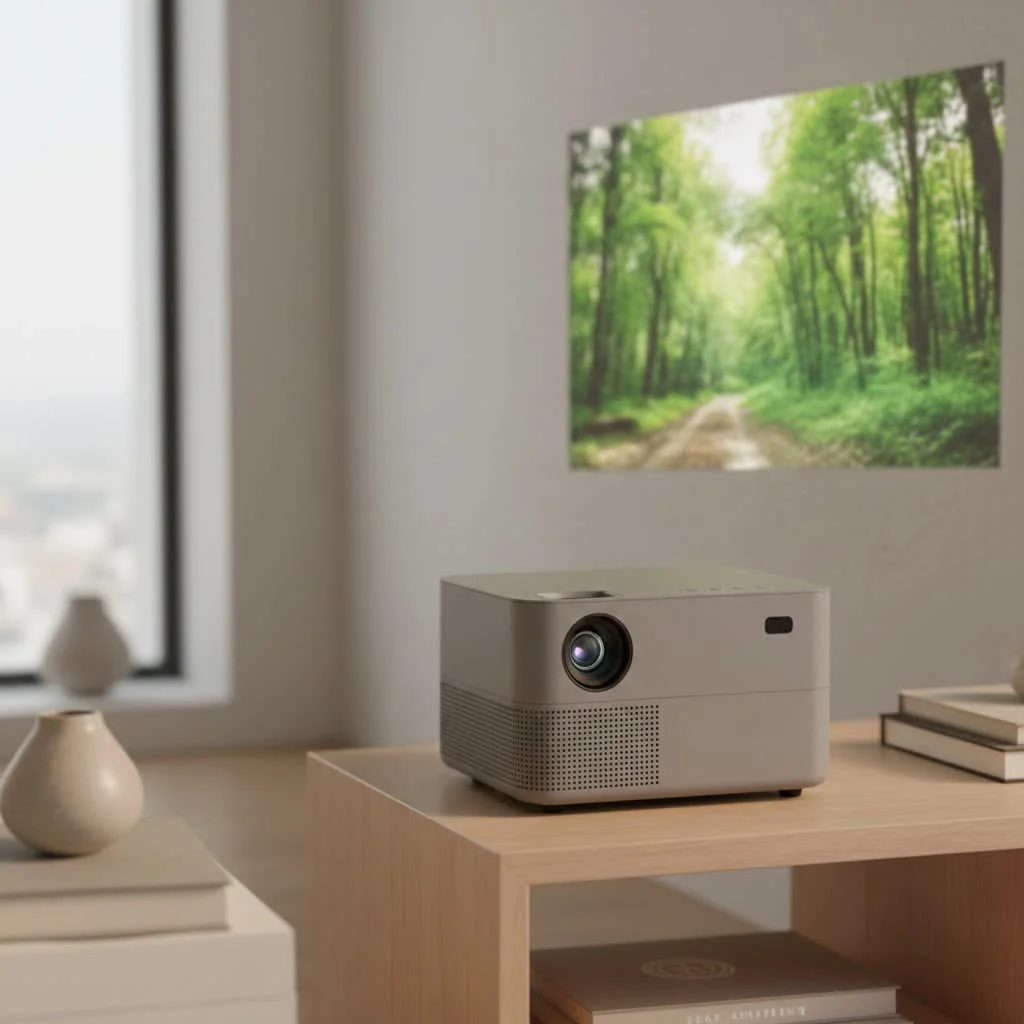
As the lead content creator at Flasf.com, I’ve spent over a decade testing, troubleshooting, and demystifying projectors of all sizes. In this in-depth review, we’ll unpack everything you need to know about the GPX mini projector, from its features and real-world performance to its hidden quirks, helping you decide if it’s the right choice for your movie nights.
What’s in the Box? Unpacking the GPX Projector Kit
One of the most appealing aspects of the GPX projector is that it’s often sold as an all-in-one kit. This means you get more than just the projector itself. While specific contents can vary by model, a typical package includes:
- The GPX Mini Projector: A lightweight and compact main unit.
- A Remote Control: For navigating menus from a distance (batteries may not be included).
- AC Power Adapter: To power the device.
- A Soft Projection Screen: Many kits come with a 100 or 120-inch foldable cloth screen, along with hooks for easy hanging.
- User Manual: To guide you through the setup process.
This bundle approach is incredibly convenient for beginners, as it removes the guesswork of finding a compatible screen.
Key Features and Specifications at a Glance
It’s important to set realistic expectations with budget projectors. The GPX is designed for accessibility and fun, not for high-end cinematic purists. Here’s a look at the typical specifications you can expect.
| Feature | Typical Specification | What It Means for You |
|---|---|---|
| Native Resolution | 480p (800×480) or 720p (1280×720) | This is not Full HD. The image will be enjoyable for cartoons and casual movie viewing but won’t be razor-sharp. Text can appear soft. |
| Connectivity | HDMI, USB, AV, SD Card | You can easily connect modern devices like a Fire Stick, Roku, laptop, or gaming console via HDMI. The USB port allows for media playback from a thumb drive. |
| Brightness | Varies (e.g., 2500 Lumens) | Brightness ratings on these projectors can be misleading. The key takeaway is that it performs best in a very dark room. It is not suitable for daytime viewing. |
| Audio | Built-in Speaker & Bluetooth Out | It has a small internal speaker for basic sound. The crucial feature is Bluetooth out, which lets you send audio to a much better external speaker or soundbar. |
| LED Lamp Life | ~20,000 Hours | The LED bulb is designed to last for many years of regular use, so you won’t have to worry about expensive replacements. |
| Max Screen Size | Up to 150 inches | While it can project a large image, the picture quality will be best at smaller sizes (around 80-100 inches) due to the native resolution. |
How to Set Up Your GPX Mini Home Theater Projector
Getting started with the GPX projector is refreshingly simple and one of its strongest selling points. You can be ready for movie night in under five minutes.
- Position the Projector: Place the projector on a stable surface, like a table or tripod, at the desired distance from your screen or wall.
- Set Up the Screen: If you’re using the included screen, hang it up. A plain, light-colored wall also works well.
- Connect Power: Plug the AC adapter into the projector and a wall outlet.
- Connect Your Source: This is the most important step. Connect your streaming stick (like an Amazon Fire Stick), laptop, or gaming console to the projector’s HDMI port.
- Power On and Select Source: Turn the projector on and use the remote or buttons on the unit to select the correct input source (e.g., HDMI).
- Adjust the Image: Once you see a picture, you’ll need to fine-tune it.
A Quick Guide to Focusing and Keystone Correction
To get the clearest possible picture, you’ll need to make two simple adjustments:
- Focus: Turn the lens ring or a dial located near the lens until the image is as sharp as possible.
- Keystone Correction: If the projector isn’t perfectly level with the screen, the image might look like a trapezoid. Use the keystone adjustment dial (usually on the back) to square up the sides of the picture.
|
Our Picks for the Best Mini Projector in 2026
As an Amazon Associate I earn from qualifying purchases.
|
||
| Num | Product | Action |
|---|---|---|
| 1 | [Compatible with Netflix & TOF Real-time Focus] Mini Projector with WiFi and Bluetooth, XuanPad Smart Projector 4K Support, Dolby Audio & Keystone, 210° Rotatable Stand for Home |
![Check [Compatible with Netflix & TOF Real-time Focus] Mini Projector with WiFi and Bluetooth, XuanPad Smart Projector 4K Support, Dolby Audio & Keystone, 210° Rotatable Stand for Home on Amazon](https://flasf.com/wp-content/plugins/amazon-tables/assets/images/buy.png)
|
| 2 | Magcubic Mini Projector with WiFi 6 and Bluetooth 5.4, Portable Projector 4K Support, 5W Soundbase Speaker, Auto Vertical Keystone 180°Rotatable Smart Proyector for Movie Home Outdoor |
|
| 3 | 【Officially-Licensed APP & Native 1080P】Thinnest 1.81\" Smart Mini Projector with WiFi and Bluetooth, Auto Focus & Keystone Portable Outdoor Projector, VOPLLS 4K Support Home Movie Projector |
|
| 4 | [Built-in Apps & 2025 Upgraded] Mini Projector Support 4K 1080P Auto Keystone 270° Rotatable with WiFi 6 and Bluetooth 5.4, Projector Portable Compatibile with HDMI/TV Stick/Memory Stick/Laptop-Black |
|
| 5 | Aurzen Roku TV Smart Projector with Wifi and Bluetooth, Roku Streaming Experience Built-in, 1080P FHD, Dolby Audio, Auto Focus & Keystone, Zoom, Movie Portable Outdoor Mini Projector, White |
|
| 6 | Aurzen EAZZE D1 Smart Projector with WiFi and Bluetooth, Netflix-Officially-Licensed, Auto Focus & Keystone, DoIby Audio, Native 1080P Movie, Portable Outdoor Mini Projector, White |
|
| 7 | [Short Throw/1200ANSI/Built in Apps] 4K Outdoor Projector with WiFi and Bluetooth, Auto Focus Projector with Dual-Mode Stand, Smart Portable Proyector with Netflix/YouTube/PrimeVideo & Dolby |
|
| 8 | Mini Portable Projector 4K WiFi 6 BT 5.2 Upgraded Portable Projector Full HD Supported for Phone /PC /TV /HDMI /PS5 /Laptop Auto Keystone Home Theater 180° Rotation [Built-in App] White |
|
| 9 | HAPPRUN Native 1080P Bluetooth Mini Projector, Full HD Portable Outdoor Movie Projector with Built-in Speaker, Compatible with Smartphone, HDMI, USB, AV, Fire Stick, PS5 for Home, Bedroom, Outdoor Use |
|
| 10 | SOOMFON Mini Projector 1080P Support - Portable Small Video Movie Projector Bluetooth 5.1 Auto Keystone Electric Focus for Bedroom/Wall/Home/Outdoor/iPhone/Android/TV Stick |
|
Putting It to the Test: Real-World Performance
Specs on a page are one thing; performance in your living room is another. Here’s how the GPX mini home theater projector holds up in real-world use.
Image Quality: Is It Good Enough for Movie Night?
For its price, the image quality is surprisingly pleasant under the right conditions. In a dark room, colors are vibrant enough and the picture is clear enough for a fun, casual viewing experience. It’s perfect for animated movies, family movie nights, or playing video games. However, the 480p or 720p native resolution means you won’t see the crisp details you’re used to on an HDTV. It’s more about the novelty and enjoyment of the large screen size than it is about pixel-perfect clarity.
The Sound Situation: Built-in Speaker vs. Bluetooth
The built-in speaker is functional but underwhelming. It’s loud enough for a small, quiet room, but it lacks bass and can be easily drowned out.
This is where the Bluetooth feature becomes essential. You can easily connect the projector to an external Bluetooth speaker or soundbar. This simple upgrade makes a world of difference, transforming the audio from a small, tinny sound into a room-filling experience that truly enhances the “home theater” feel.
The Elephant in the Room: How Loud is the Fan?
Like all projectors, the GPX has an internal fan to keep the bulb cool. In user reviews, the fan noise is a common point of discussion. It is audible, especially in quiet scenes. However, most users find that once the movie’s audio is playing, particularly through an external speaker, the fan noise fades into the background and is not a major distraction.
The Big Question: How Do You Connect a Phone?
This is one of the most common points of confusion. The GPX mini home theater projector does not support wireless video streaming from a phone via Bluetooth. Bluetooth technology is used here only for audio output.
To project content from your smartphone or tablet, you must use a wired connection. You will need to purchase a specific adapter that converts your phone’s charging port to an HDMI output.
- For iPhones/iPads: You need a “Lightning to Digital AV Adapter.”
- For Android Devices: You may need a “USB-C to HDMI Adapter,” but you must check if your specific phone model supports video output over USB-C.
Using the correct adapter is the only reliable way to mirror your phone’s screen.
Pros and Cons: A Balanced View
“The GPX mini projector isn’t competing with high-end home cinema systems,” says David Chen, lead product analyst at Flasf.com. “Instead, it excels at creating accessible, fun, and spontaneous big-screen experiences. It’s the perfect ‘grab-and-go’ device for a backyard movie night or a kid’s bedroom.”
Here is a summary of the strengths and weaknesses to help you make an informed decision.
Pros:
- Excellent Value: Very affordable, especially when bundled with a screen.
- Extremely Portable: Its small size and light weight make it easy to move around or take with you.
- Simple Setup: You can go from box to movie in minutes, making it very beginner-friendly.
- Versatile Connectivity: The HDMI port allows you to connect countless modern media devices.
Cons:
- Low Resolution: The picture is not HD, which is most noticeable with text or fine details.
- Requires a Dark Room: The brightness is not sufficient for rooms with any significant ambient light.
- Weak Internal Speaker: An external Bluetooth speaker is highly recommended for an immersive experience.
- Audible Fan Noise: The cooling fan is noticeable in quiet environments.
Frequently Asked Questions (FAQ)
Can I watch Netflix on the GPX mini projector?
Yes, the easiest way is by plugging in a streaming device like an Amazon Fire Stick, Roku, or Apple TV into the HDMI port. You can then access Netflix and all your other streaming apps.
Can I use the GPX projector outside?
Absolutely! It’s perfect for backyard movie nights. Just be sure to wait until it’s fully dark outside for the best and brightest picture.
Why is there no sound when I connect my device?
First, check the volume level on both your source device and the projector. If you are using an external speaker, ensure it is properly connected. Remember, HDMI carries both video and audio.
How can I make the picture clearer?
Make sure you have carefully adjusted the manual focus dial. Also, ensure the room is as dark as possible, as any ambient light will wash out the image and reduce perceived sharpness.
Does the projector work wirelessly with my phone?
No, it cannot receive video wirelessly. It can only send audio out to Bluetooth speakers. To connect a phone, you need a specific HDMI adapter.
Final Verdict: Who Should Buy the GPX Mini Home Theater Projector?
The GPX mini home theater projector is not for the discerning videophile seeking pristine, high-definition image quality. Instead, it is a fantastic and highly recommended product for a specific audience: families, kids, and casual users who prioritize fun, portability, and affordability over technical perfection.
If you’re looking for an easy and inexpensive way to create magical movie nights in the backyard, entertain the kids in their room, or have a big screen for gaming without breaking the bank, this projector is an outstanding choice. By understanding its limitations—primarily the need for a dark room and an external speaker—you can unlock a world of entertainment that offers incredible value for its price.
Frequently Asked Questions
- Can I watch Netflix on the GPX mini projector?
- Yes, you can watch Netflix on the GPX mini projector by connecting a streaming device such as an Amazon Fire Stick, Roku, or Apple TV to its HDMI port. This allows you to access Netflix and other streaming applications directly through the projector.
- Can the GPX mini home theater projector be used outdoors?
- Absolutely, the GPX mini home theater projector is ideal for outdoor use, especially for backyard movie nights. For the best and brightest picture quality, ensure that you use it in a fully dark environment.
- Why is there no sound when I connect a device to the GPX projector?
- If there's no sound, first check the volume levels on both your source device and the projector itself. Ensure any external speakers are properly connected, as the HDMI connection carries both video and audio signals.
- How can I improve the picture clarity on my GPX mini projector?
- To improve picture clarity, carefully adjust the manual focus dial located near the lens until the image appears sharp. Additionally, ensure the room is as dark as possible, as ambient light significantly reduces perceived sharpness and washes out the image.
- Does the GPX mini projector support wireless video from a smartphone?
- No, the GPX mini projector does not support wireless video streaming from a smartphone; its Bluetooth functionality is solely for audio output. To connect a phone, you must use a specific wired HDMI adapter, such as a Lightning to Digital AV Adapter for iPhones or a USB-C to HDMI Adapter for compatible Android devices.
Set Up Your GPX Mini Home Theater Projector
Setting up the GPX mini projector is straightforward, allowing you to enjoy movie night in under five minutes.
- Position the Projector
Place the GPX projector on a stable surface like a table or tripod. Ensure it is at the desired distance from your projection screen or a plain, light-colored wall. - Set Up the Screen
If your kit includes a screen, hang it securely. Alternatively, a smooth, light-colored wall can serve as an effective projection surface for casual viewing. - Connect Power and Source
Plug the AC adapter into the projector and a wall outlet. Then, connect your media source, such as a streaming stick, laptop, or gaming console, to the projector's HDMI port. - Power On and Select Input
Turn on the projector. Use the remote control or the buttons on the unit to navigate the menu and select the correct input source, such as 'HDMI'. - Adjust Focus and Keystone
Once an image appears, turn the lens ring to sharpen the focus. If the image is trapezoidal, use the keystone adjustment dial (usually on the back) to square up the picture.

This GPX mini projector is exactly what I needed for my dorm room. It’s so compact and easy to move around, and I can project movies right onto my wall. The fact that it’s designed for casual home entertainment really fits my needs, and I didn’t have to break the bank. Great for gaming too!
I picked up the GPX mini home theater projector after reading about its portability, and it’s been a game-changer for backyard movie nights. The 100-inch screen that came with it was a nice bonus and super easy to set up. For under $100, the picture quality is surprisingly decent, especially in the dark. It’s not 4K, but for casual viewing, it totally gets the job done.
We got the GPX mini home theater projector for camping trips, and it’s been a hit. The setup is quick, and having a large-screen experience out in nature is pretty cool. It’s definitely an accessible entry point for someone who doesn’t want to invest in a super expensive projector, and the picture holds up well enough for outdoor viewing after dusk.
I was excited about the GPX projector for its budget-friendly price, but the 480p native resolution is definitely noticeable. It’s fine for cartoons or background ambiance, but if you’re watching something with a lot of detail, it can look a bit soft. I do appreciate the HDMI connectivity, which makes hooking up my Roku stick a breeze, but I wish the picture was a little sharper.