The Elephas mini projector is a budget-friendly portable projector that offers native 1080P resolution, Wi-Fi, and Bluetooth connectivity, making it an excellent entry-level option for casual home entertainment and on-the-go use. Priced significantly lower than high-end models, it delivers a large-screen experience for movies, gaming, and presentations, performing best in dimly lit environments.
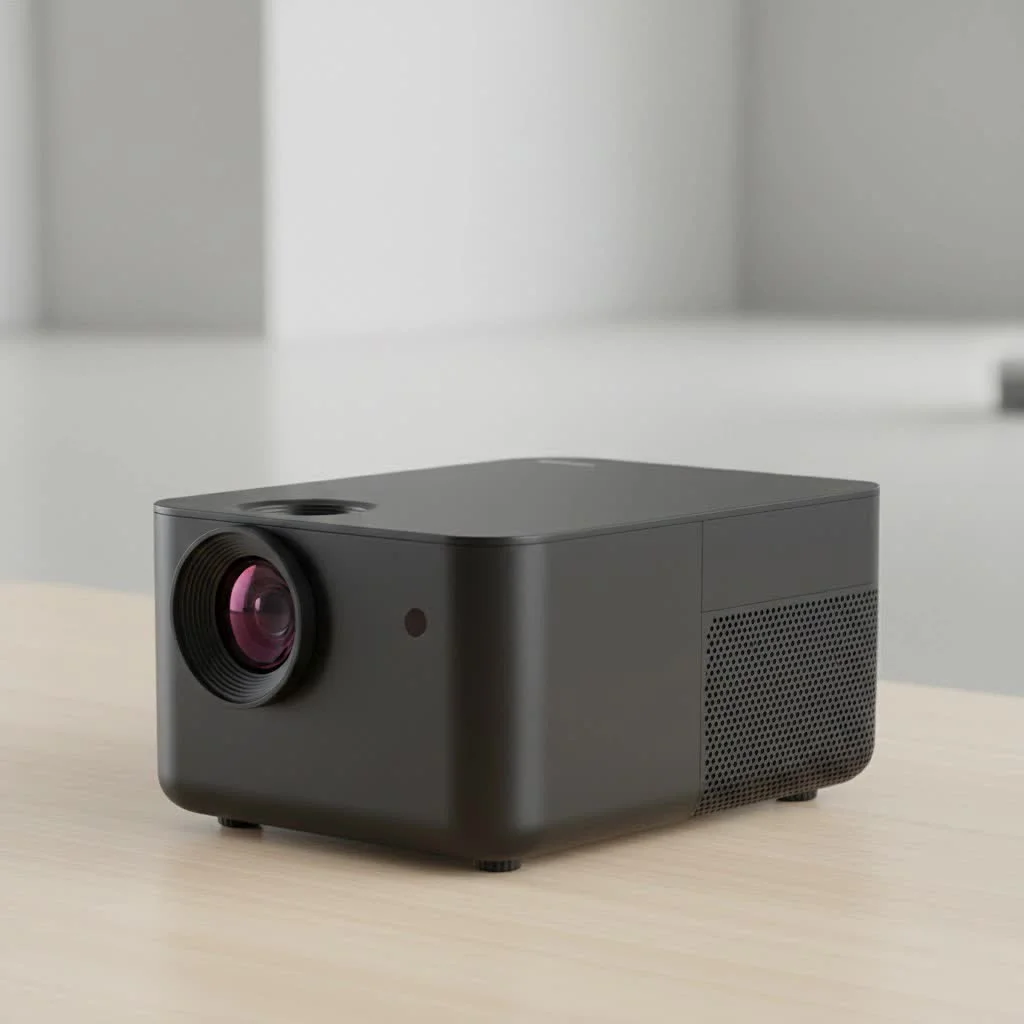 mini projector displaying a vibrant movie scene” style=”margin: 20px auto;width: 800px;max-width: 100%;height: auto” />
The appeal of a mini projector is undeniable. It promises the magic of a cinema, packed into a device that can fit in your backpack. Elephas has carved out a significant niche by offering feature-rich projectors at a price point that is hard to ignore. From the popular ELEPHAS W90 to the upgraded 2024 models, the brand consistently aims to blend performance with portability. This guide breaks down everything you need to know, from picture quality and connectivity to real-world performance and whether an Elephas mini projector is the right choice for you.
What Sets the Elephas Mini Projector Apart?
In a crowded market, Elephas projectors distinguish themselves primarily through their aggressive pricing and robust feature sets for the cost. They are often positioned as ideal entry-level devices for users who want to experiment with projection technology without a significant financial commitment. Most models, especially the recent releases, come equipped with native 1080P resolution, which is a significant step up from the 480p or 720p resolutions common in this price bracket a few years ago.
Another key feature is their focus on user-friendly connectivity. Many Elephas models boast both Wi-Fi and Bluetooth capabilities, allowing for seamless screen mirroring from smartphones (iOS and Android) and the ability to connect to external speakers or headphones for a much-improved audio experience.
As our in-house tech expert, James Caldwell, often says, “The goal of a great entry-level projector isn’t to compete with a $2,000 home theater system. It’s to deliver a fun, accessible, and surprisingly good big-screen experience. Elephas consistently hits that mark by packing in features like native 1080p and Wi-Fi where it matters most for casual users.”
Key Features Across Popular Models:
- Native 1080P Resolution: Provides a clear and detailed image, suitable for movies and presentations.
- Wi-Fi Connectivity: Enables easy wireless screen mirroring from your phone, tablet, or laptop.
- Bluetooth 5.1 (or higher): Allows you to connect to external Bluetooth speakers or soundbars for immersive audio.
- High Brightness: Many models claim brightness levels of over 10,000 lumens, making them usable in dimly lit rooms.
- Multiple Inputs: Typically includes HDMI, USB, and AV ports for connecting a wide range of devices like Fire TV Stick, Roku, laptops, and game consoles.
- Portability: Compact and lightweight design makes it easy to move from room to room or take on the go.
Diving Deep: Performance and Picture Quality
Let’s talk about the most crucial aspect: how does the picture actually look? The native 1080P resolution on models like the ELEPHAS 2024 Upgraded projector is a genuine advantage. This means the projector’s internal hardware has a 1920×1080 pixel grid, resulting in a sharp image without the downscaling that plagues lower-resolution projectors. When watching high-definition content, text is legible, and details in movies are well-defined.
However, it’s important to manage expectations regarding brightness. While the advertised lumen counts are high, these figures should be taken with a grain of salt as industry standards for measuring brightness can vary. In practice, an Elephas mini projector performs best in a dark or very dimly lit room. The darker the environment, the more vibrant and contrasted the image will be. During daylight hours, even with curtains drawn, the picture can appear washed out.
Color accuracy is generally good for the price, delivering a pleasant viewing experience for films and casual TV watching. For professional photo editing or color-critical work, however, you would need to invest in a much more expensive, color-calibrated projector.
Setting Up Your Elephas Projector: A Step-by-Step Guide
One of the best things about Elephas projectors is their plug-and-play simplicity. Here’s a quick guide to get you started:
- Position the Projector: Place the projector on a stable surface like a table or tripod. Aim it at a plain, light-colored wall or a projector screen for the best results. The distance will determine the screen size—further back means a bigger picture.
- Power It On: Connect the power cord and turn on the device using the button on the unit or the remote control.
- Adjust the Focus: Use the focus wheel (usually located around the lens) to get a sharp, clear image. Adjust it until the pixels are crisp.
- Correct the Keystone: If the projector is at an angle, the image might look like a trapezoid. Use the keystone correction dial or digital adjustment to make the image a perfect rectangle.
- Connect Your Device:
- Wireless: Navigate to the screen mirroring option on the projector’s menu. On your smartphone, select Screen Mirroring (iOS) or Smart View/Cast (Android) and choose the projector from the list of available devices.
- Wired (HDMI): For the most stable connection, use an HDMI cable to connect your laptop, streaming stick (like a Fire TV Stick or Roku), or gaming console.
- Connect Audio: For a true cinematic feel, connect the projector to a Bluetooth speaker. Go to the projector’s Bluetooth settings, make your speaker discoverable, and pair the two devices.
Who Should Buy an Elephas Mini Projector?
An Elephas projector is an excellent choice for a specific type of user. It might be the perfect fit for you if:
- You’re a First-Time Buyer: If you’re new to projectors and want to try one out without breaking the bank, Elephas offers a low-risk entry point.
- You Want Casual Entertainment: It’s perfect for family movie nights, watching YouTube videos on the big screen, or creating a fun backyard cinema experience.
- You Need Portability: Its small size makes it great for taking to a friend’s house, on vacation, or simply moving it between rooms.
- You’re on a Tight Budget: It delivers a large screen experience for a fraction of the cost of a large-screen TV.
However, it may not be the right choice for:
- Home Theater Purists: If you demand perfect color accuracy, deep blacks, and high-end performance, you’ll need to look at higher-end brands.
- Daylight Viewing: If you plan to use it primarily in a bright room, the image will likely be too dim to be enjoyable.
- Professional Presentations: While it can work for basic slides, its brightness and color limitations might not be suitable for important business meetings.
Frequently Asked Questions (FAQ)
How do I connect my iPhone to an Elephas mini projector?
|
Our Picks for the Best Mini Projector in 2026
As an Amazon Associate I earn from qualifying purchases.
|
||
| Num | Product | Action |
|---|---|---|
| 1 | Aurzen EAZZE D1 Smart Projector with WiFi and Bluetooth, Netflix-Officially-Licensed, Auto Focus & Keystone, DoIby Audio, Native 1080P Movie, Portable Outdoor Mini Projector, White |

|
| 2 | [Built-in Apps & 2025 Upgraded] Mini Projector Support 4K 1080P Auto Keystone 270° Rotatable with WiFi 6 and Bluetooth 5.4, Projector Portable Compatibile with HDMI/TV Stick/Memory Stick/Laptop-Black |
|
| 3 | Magcubic Mini Projector with WiFi 6 and Bluetooth 5.4, Portable Projector 4K Support, 5W Soundbase Speaker, Auto Vertical Keystone 180°Rotatable Smart Proyector for Movie Home Outdoor |
|
| 4 | 【Officially-Licensed APP & Native 1080P】Thinnest 1.81\" Smart Mini Projector with WiFi and Bluetooth, Auto Focus & Keystone Portable Outdoor Projector, VOPLLS 4K Support Home Movie Projector |
|
| 5 | [Short Throw/1200ANSI/Built in Apps] 4K Outdoor Projector with WiFi and Bluetooth, Auto Focus Projector with Dual-Mode Stand, Smart Portable Proyector with Netflix/YouTube/PrimeVideo & Dolby |
|
| 6 | Aurzen Roku TV Smart Projector with Wifi and Bluetooth, Roku Streaming Experience Built-in, 1080P FHD, Dolby Audio, Auto Focus & Keystone, Zoom, Movie Portable Outdoor Mini Projector, White |
|
| 7 | [Compatible with Netflix & TOF Real-time Focus] Mini Projector with WiFi and Bluetooth, XuanPad Smart Projector 4K Support, Dolby Audio & Keystone, 210° Rotatable Stand for Home |
|
| 8 | Mini Portable Projector 4K WiFi 6 BT 5.2 Upgraded Portable Projector Full HD Supported for Phone /PC /TV /HDMI /PS5 /Laptop Auto Keystone Home Theater 180° Rotation [Built-in App] White |
|
| 9 | HAPPRUN Native 1080P Bluetooth Mini Projector, Full HD Portable Outdoor Movie Projector with Built-in Speaker, Compatible with Smartphone, HDMI, USB, AV, Fire Stick, PS5 for Home, Bedroom, Outdoor Use |
|
| 10 | SOOMFON Mini Projector 1080P Support - Portable Small Video Movie Projector Bluetooth 5.1 Auto Keystone Electric Focus for Bedroom/Wall/Home/Outdoor/iPhone/Android/TV Stick |
|
The easiest way is to use the built-in Wi-Fi screen mirroring feature. Connect both your iPhone and the projector to the same Wi-Fi network. Then, on your iPhone, open the Control Center, tap “Screen Mirroring,” and select the Elephas projector from the list.
Can I watch Netflix or other streaming apps?
Due to HDCP copyright protection, you cannot directly mirror apps like Netflix or Amazon Prime Video from your phone. The best solution is to use an HDMI cable to connect a streaming device like an Amazon Fire TV Stick, Roku, or Apple TV to the projector.
Does the Elephas projector have a built-in battery?
Most Elephas mini projectors do not have a built-in battery and require a constant connection to a power outlet to operate. Always check the specifications of the specific model you are interested in.
What is the lamp life of an Elephas projector?
Elephas projectors typically use LED lamps, which have a very long lifespan. Many models are rated for 50,000 hours or more, which means you could watch a two-hour movie every single day for over 60 years before the lamp needs replacing.
Is the fan noise loud?
Like all projectors, Elephas models have an internal fan to cool the lamp. While they have improved their cooling systems to reduce noise, you will still hear a fan whir, especially in quiet scenes. The sound is generally not distracting once your movie’s audio starts playing.
Final Verdict: A Great Value for Fun and Flexibility
After extensive review, it’s clear that the Elephas mini projector offers outstanding value for its price. It successfully democratizes the big-screen experience, making it accessible to almost anyone. While it can’t compete with premium home theater projectors that cost ten times as much, it isn’t trying to. Instead, it delivers a fun, flexible, and surprisingly capable performance for movie nights, casual gaming, and sharing content. If you manage your expectations and use it in a suitably dark environment, you’ll be thrilled with the massive and immersive picture you get for your money.
Frequently Asked Questions
How do I connect my iPhone to an Elephas mini projector?
The easiest way to connect your iPhone is by using the built-in Wi-Fi screen mirroring feature. Ensure both your iPhone and the projector are connected to the same Wi-Fi network, then access Screen Mirroring from your iPhone's Control Center and select the Elephas projector.
Can I watch Netflix or other streaming apps directly on an Elephas projector?
Due to HDCP copyright protection, direct mirroring of apps like Netflix or Amazon Prime Video from your phone is not supported. The best solution is to connect an external streaming device, such as an Amazon Fire TV Stick, Roku, or Apple TV, via an HDMI cable to the projector.
Does the Elephas mini projector include a built-in battery for portable use?
Most Elephas mini projectors do not feature a built-in battery and require a continuous connection to a power outlet for operation. It is always recommended to verify the specific model's specifications for battery information.
What is the expected lamp lifespan of an Elephas projector?
Elephas projectors typically utilize LED lamps, which boast a very long operational lifespan. Many models are rated for 50,000 hours or more, meaning the lamp could last for over 60 years with daily two-hour usage before needing replacement.
Is the fan noise from an Elephas mini projector noticeable during operation?
Like all projectors, Elephas models incorporate an internal fan for cooling. While cooling systems have improved to reduce noise, a fan whir will still be audible, particularly during quiet scenes. This sound generally becomes unnoticeable once movie audio begins playing.
Set Up Your Elephas Mini Projector
Follow these steps to quickly set up your Elephas mini projector for an optimal viewing experience.
Place the projector on a stable surface, such as a table or tripod, and aim it at a plain, light-colored wall or a dedicated projector screen. The distance from the surface will determine the projected screen size.
Connect the power cord and turn on the projector using either the unit's button or the remote control. Use the focus wheel, typically located near the lens, to achieve a sharp and clear image by adjusting until pixels are crisp.
If the image appears trapezoidal due to an angled projection, use the keystone correction dial or digital adjustment to form a perfect rectangle. Then, connect your device either wirelessly via screen mirroring (iOS/Android) or with an HDMI cable for a stable connection from laptops or streaming sticks.
For an enhanced cinematic experience, connect the projector to a Bluetooth speaker. Navigate to the projector's Bluetooth settings, make your speaker discoverable, and pair the two devices for immersive sound.
Get our weekly buyer guide
Practical specs, not advice. Unsubscribe anytime.
I picked up the ELEPHAS W90 model after reading about its features, and I’m pretty happy with it. The Bluetooth connectivity is a huge plus for hooking up my external speaker, which really enhances the sound for movies. It’s a great entry-level projector for someone who wants a big screen experience without the high-end cost.
Got this for gaming on the go, and while it’s super portable, I found that it really needs a very dimly lit environment to shine. In a room with even a little ambient light, the picture quality suffers quite a bit. It’s fine for a dark tent or late-night movie, but don’t expect it to compete with a TV during the day.
This little projector is a game-changer for presentations when I travel. It fits right in my backpack and connects easily to my laptop. The picture is clear enough for charts and graphs, and it’s so much better than huddling around a small screen. It really lives up to the promise of portability and performance.
I was looking for a budget-friendly option for movie nights in the backyard, and the Elephas mini projector totally delivered! The native 1080P resolution is surprisingly good for the price, and setting it up with Wi-Fi was a breeze. It’s perfect for casual home entertainment, just like the guide mentioned. Definitely recommend it if you’re not trying to break the bank.